

3D software for factory layout & plant design

Powerful Professional CAD software for your projects

Free 2D/3D CAD Software

P&ID Software for Intelligent Piping Schematics

Automatic Piping Isometrics for Fabrication and Installation

3D/2D viewer for CAD models and drawings

We develop individually tailored VR solutions
Virtual online meetings
Virtual Reality Viewer for 3D CAD models

Augmented Reality Solutions for Industry
AR-Viewer App for viewing 3D models in augmented reality
Augmented Reality (AR) for your product catalogs
3D software for factory layout & plant design
Powerful Professional CAD software for your projects
Free 2D/3D CAD Software
P&ID Software for Intelligent Piping Schematics
Automatic Piping Isometrics for Fabrication and Installation
3D/2D viewer for CAD models and drawings
We develop individually tailored VR solutions
Virtual online meetings
Virtual Reality Viewer for 3D CAD models
Augmented Reality Solutions for Industry
AR-Viewer App for viewing 3D models in augmented reality
Augmented Reality (AR) for your product catalogs
Expand the possibilities of your CAD systems with customised function development
Seamless integration of your systems and processes
Development of web applications, 3D web apps and web portals
Online configurators that truly integrate into your processes
Efficient data management for your company
Intuitive and user-friendly design solutions
Professional administration of your CAD software for optimum performance
Always keep your CAD systems up to date
Customised augmented reality (AR) solutions
Using augmented reality for your company
Customised virtual reality (VR) solutions
Seamless integration and customised interfaces
Customised user experience (UX) solutions
Expand the possibilities of your AR and VR applications
Customised augmented reality and virtual reality solutions
Customised developments for immersive AR and VR experiences
Advanced identity management for your AR and VR experiences
Expand the possibilities of your CAD systems with customised function development
Seamless integration of your systems and processes
Development of web applications, 3D web apps and web portals
Online configurators that truly integrate into your processes
Efficient data management for your company
Intuitive and user-friendly design solutions
Professional administration of your CAD software for optimum performance
Always keep your CAD systems up to date
Customised augmented reality (AR) solutions
Using augmented reality for your company with smartphones and tablets
Customised virtual reality (VR) solutions
Seamless integration and customised interfaces
Customised user experience (UX) solutions
Expand the possibilities of your AR and VR applications
Customised augmented reality and virtual reality solutions
Customised developments for immersive AR and VR experiences
Advanced identity management for your AR and VR experiences
Top support for your software package
Customer Organised Services (COS) – optimally adapting your software to meet your requirements
Tools for optimal support of your software products
The portal provides the latest software news, software updates ready for download, as well as software issue reporting and tracking tools.
Top support for your software package
Customer Organised Services (COS) – optimally adapting your software to meet your requirements
Tools for optimal support of your software products
The portal provides the latest software news, software updates ready for download, as well as software issue reporting and tracking tools.
Read CAD Schroer’s latest software product news, corporate updates, customer news and the press releases we regularly issue
Informative and fascinating articles and contributions from CAD Schroer regarding all aspects of factory planning, plant engineering, design and data management.
CAD Schroer’s teams regularly attend industry-specific exhibitions and conferences. We also hold our own events. Find out more about upcoming shows.
We also hold our own events and international road shows for customers and prospects, as well as offering time-saving Webinars.
Our newsletter contains informative articles on topics such as IoT and CAD in mechanical engineering, plant design and factory layout.
Read CAD Schroer’s latest software product news, corporate updates, customer news and the press releases we regularly issue
Informative and fascinating articles and contributions from CAD Schroer regarding all aspects of factory planning, plant engineering, design and data management.
CAD Schroer’s teams regularly attend industry-specific exhibitions and conferences. We also hold our own events. Find out more about upcoming shows.
We also hold our own events and international road shows for customers and prospects, as well as offering time-saving Webinars.
Our newsletter contains informative articles on topics such as IoT and CAD in mechanical engineering, plant design and factory layout.

Fritz-Peters-Straße 11
47447 Moers
Germany
CAD Schroer is a global software development company and engineering solutions provider
CAD Schroer is committed to local, friendly, and technically competent advice for its customers.
CAD Schroer’s customers are leaders in their field.
Free Licenses for Educational and Research Establishments
Are you a technical computing enthusiast looking for the next challenge?
CAD Schroer contributes to a better, fairer and more sustainable future based on four foundations: climate protection, culture, education and satisfied employees.
Headquarters and subsidiaries worldwide
Fritz-Peters-Straße 11
47447 Moers
Germany
CAD Schroer is a global software development company and engineering solutions provider
CAD Schroer is committed to local, friendly, and technically competent advice for its customers.
CAD Schroer’s customers are leaders in their field.
Free Licenses for Educational and Research Establishments
Are you a technical computing enthusiast looking for the next challenge?
CAD Schroer contributes to a better, fairer and more sustainable future based on four foundations: climate protection, culture, education and satisfied employees.
Headquarters and subsidiaries worldwide
3D software for factory layout & plant design
Powerful Professional CAD software for your projects
Free 2D/3D CAD Software
P&ID Software for Intelligent Piping Schematics
Automatic Piping Isometrics for Fabrication and Installation
3D/2D viewer for CAD models and drawings
We develop individually tailored VR solutions
Virtual online meetings
Virtual Reality Viewer for 3D CAD models
Augmented Reality Solutions for Industry
AR-Viewer App for viewing 3D models in augmented reality
Augmented Reality (AR) for your product catalogs
3D software for factory layout & plant design
Powerful Professional CAD software for your projects
Free 2D/3D CAD Software
P&ID Software for Intelligent Piping Schematics
Automatic Piping Isometrics for Fabrication and Installation
3D/2D viewer for CAD models and drawings
We develop individually tailored VR solutions
Virtual online meetings
Virtual Reality Viewer for 3D CAD models
Augmented Reality Solutions for Industry
AR-Viewer App for viewing 3D models in augmented reality
Augmented Reality (AR) for your product catalogs
Expand the possibilities of your CAD systems with customised function development
Seamless integration of your systems and processes
Development of web applications, 3D web apps and web portals
Online configurators that truly integrate into your processes
Efficient data management for your company
Intuitive and user-friendly design solutions
Professional administration of your CAD software for optimum performance
Always keep your CAD systems up to date
Customised augmented reality (AR) solutions
Using augmented reality for your company
Customised virtual reality (VR) solutions
Seamless integration and customised interfaces
Customised user experience (UX) solutions
Expand the possibilities of your AR and VR applications
Customised augmented reality and virtual reality solutions
Customised developments for immersive AR and VR experiences
Advanced identity management for your AR and VR experiences
Expand the possibilities of your CAD systems with customised function development
Seamless integration of your systems and processes
Development of web applications, 3D web apps and web portals
Online configurators that truly integrate into your processes
Efficient data management for your company
Intuitive and user-friendly design solutions
Professional administration of your CAD software for optimum performance
Always keep your CAD systems up to date
Customised augmented reality (AR) solutions
Using augmented reality for your company with smartphones and tablets
Customised virtual reality (VR) solutions
Seamless integration and customised interfaces
Customised user experience (UX) solutions
Expand the possibilities of your AR and VR applications
Customised augmented reality and virtual reality solutions
Customised developments for immersive AR and VR experiences
Advanced identity management for your AR and VR experiences
Top support for your software package
Customer Organised Services (COS) – optimally adapting your software to meet your requirements
Tools for optimal support of your software products
The portal provides the latest software news, software updates ready for download, as well as software issue reporting and tracking tools.
Top support for your software package
Customer Organised Services (COS) – optimally adapting your software to meet your requirements
Tools for optimal support of your software products
The portal provides the latest software news, software updates ready for download, as well as software issue reporting and tracking tools.
Read CAD Schroer’s latest software product news, corporate updates, customer news and the press releases we regularly issue
Informative and fascinating articles and contributions from CAD Schroer regarding all aspects of factory planning, plant engineering, design and data management.
CAD Schroer’s teams regularly attend industry-specific exhibitions and conferences. We also hold our own events. Find out more about upcoming shows.
We also hold our own events and international road shows for customers and prospects, as well as offering time-saving Webinars.
Our newsletter contains informative articles on topics such as IoT and CAD in mechanical engineering, plant design and factory layout.
Read CAD Schroer’s latest software product news, corporate updates, customer news and the press releases we regularly issue
Informative and fascinating articles and contributions from CAD Schroer regarding all aspects of factory planning, plant engineering, design and data management.
CAD Schroer’s teams regularly attend industry-specific exhibitions and conferences. We also hold our own events. Find out more about upcoming shows.
We also hold our own events and international road shows for customers and prospects, as well as offering time-saving Webinars.
Our newsletter contains informative articles on topics such as IoT and CAD in mechanical engineering, plant design and factory layout.
Fritz-Peters-Straße 11
47447 Moers
Germany
CAD Schroer is a global software development company and engineering solutions provider
CAD Schroer is committed to local, friendly, and technically competent advice for its customers.
CAD Schroer’s customers are leaders in their field.
Free Licenses for Educational and Research Establishments
Are you a technical computing enthusiast looking for the next challenge?
CAD Schroer contributes to a better, fairer and more sustainable future based on four foundations: climate protection, culture, education and satisfied employees.
Headquarters and subsidiaries worldwide
Fritz-Peters-Straße 11
47447 Moers
Germany
CAD Schroer is a global software development company and engineering solutions provider
CAD Schroer is committed to local, friendly, and technically competent advice for its customers.
CAD Schroer’s customers are leaders in their field.
Free Licenses for Educational and Research Establishments
Are you a technical computing enthusiast looking for the next challenge?
CAD Schroer contributes to a better, fairer and more sustainable future based on four foundations: climate protection, culture, education and satisfied employees.
Headquarters and subsidiaries worldwide
3D software for factory layout & plant design
Powerful Professional CAD software for your projects
Free 2D/3D CAD Software
P&ID Software for Intelligent Piping Schematics
Automatic Piping Isometrics for Fabrication and Installation
3D/2D viewer for CAD models and drawings
We develop individually tailored VR solutions
Virtual online meetings
Virtual Reality Viewer for 3D CAD models
Augmented Reality Solutions for Industry
AR-Viewer App for viewing 3D models in augmented reality
Augmented Reality (AR) for your product catalogs
3D software for factory layout & plant design
Powerful Professional CAD software for your projects
Free 2D/3D CAD Software
P&ID Software for Intelligent Piping Schematics
Automatic Piping Isometrics for Fabrication and Installation
3D/2D viewer for CAD models and drawings
We develop individually tailored VR solutions
Virtual online meetings
Virtual Reality Viewer for 3D CAD models
Augmented Reality Solutions for Industry
AR-Viewer App for viewing 3D models in augmented reality
Augmented Reality (AR) for your product catalogs
Expand the possibilities of your CAD systems with customised function development
Seamless integration of your systems and processes
Development of web applications, 3D web apps and web portals
Online configurators that truly integrate into your processes
Efficient data management for your company
Intuitive and user-friendly design solutions
Professional administration of your CAD software for optimum performance
Always keep your CAD systems up to date
Customised augmented reality (AR) solutions
Using augmented reality for your company
Customised virtual reality (VR) solutions
Seamless integration and customised interfaces
Customised user experience (UX) solutions
Expand the possibilities of your AR and VR applications
Customised augmented reality and virtual reality solutions
Customised developments for immersive AR and VR experiences
Advanced identity management for your AR and VR experiences
Expand the possibilities of your CAD systems with customised function development
Seamless integration of your systems and processes
Development of web applications, 3D web apps and web portals
Online configurators that truly integrate into your processes
Efficient data management for your company
Intuitive and user-friendly design solutions
Professional administration of your CAD software for optimum performance
Always keep your CAD systems up to date
Customised augmented reality (AR) solutions
Using augmented reality for your company with smartphones and tablets
Customised virtual reality (VR) solutions
Seamless integration and customised interfaces
Customised user experience (UX) solutions
Expand the possibilities of your AR and VR applications
Customised augmented reality and virtual reality solutions
Customised developments for immersive AR and VR experiences
Advanced identity management for your AR and VR experiences
Top support for your software package
Customer Organised Services (COS) – optimally adapting your software to meet your requirements
Tools for optimal support of your software products
The portal provides the latest software news, software updates ready for download, as well as software issue reporting and tracking tools.
Top support for your software package
Customer Organised Services (COS) – optimally adapting your software to meet your requirements
Tools for optimal support of your software products
The portal provides the latest software news, software updates ready for download, as well as software issue reporting and tracking tools.
Read CAD Schroer’s latest software product news, corporate updates, customer news and the press releases we regularly issue
Informative and fascinating articles and contributions from CAD Schroer regarding all aspects of factory planning, plant engineering, design and data management.
CAD Schroer’s teams regularly attend industry-specific exhibitions and conferences. We also hold our own events. Find out more about upcoming shows.
We also hold our own events and international road shows for customers and prospects, as well as offering time-saving Webinars.
Our newsletter contains informative articles on topics such as IoT and CAD in mechanical engineering, plant design and factory layout.
Read CAD Schroer’s latest software product news, corporate updates, customer news and the press releases we regularly issue
Informative and fascinating articles and contributions from CAD Schroer regarding all aspects of factory planning, plant engineering, design and data management.
CAD Schroer’s teams regularly attend industry-specific exhibitions and conferences. We also hold our own events. Find out more about upcoming shows.
We also hold our own events and international road shows for customers and prospects, as well as offering time-saving Webinars.
Our newsletter contains informative articles on topics such as IoT and CAD in mechanical engineering, plant design and factory layout.
Fritz-Peters-Straße 11
47447 Moers
Germany
CAD Schroer is a global software development company and engineering solutions provider
CAD Schroer is committed to local, friendly, and technically competent advice for its customers.
CAD Schroer’s customers are leaders in their field.
Free Licenses for Educational and Research Establishments
Are you a technical computing enthusiast looking for the next challenge?
CAD Schroer contributes to a better, fairer and more sustainable future based on four foundations: climate protection, culture, education and satisfied employees.
Headquarters and subsidiaries worldwide
Fritz-Peters-Straße 11
47447 Moers
Germany
CAD Schroer is a global software development company and engineering solutions provider
CAD Schroer is committed to local, friendly, and technically competent advice for its customers.
CAD Schroer’s customers are leaders in their field.
Free Licenses for Educational and Research Establishments
Are you a technical computing enthusiast looking for the next challenge?
CAD Schroer contributes to a better, fairer and more sustainable future based on four foundations: climate protection, culture, education and satisfied employees.
Headquarters and subsidiaries worldwide
3D software for factory layout & plant design
Powerful Professional CAD software for your projects
Free 2D/3D CAD Software
P&ID Software for Intelligent Piping Schematics
Automatic Piping Isometrics for Fabrication and Installation
3D/2D viewer for CAD models and drawings
We develop individually tailored VR solutions
Virtual online meetings
Virtual Reality Viewer for 3D CAD models
Augmented Reality Solutions for Industry
AR-Viewer App for viewing 3D models in augmented reality
Augmented Reality (AR) for your product catalogs
3D software for factory layout & plant design
Powerful Professional CAD software for your projects
Free 2D/3D CAD Software
P&ID Software for Intelligent Piping Schematics
Automatic Piping Isometrics for Fabrication and Installation
3D/2D viewer for CAD models and drawings
We develop individually tailored VR solutions
Virtual online meetings
Virtual Reality Viewer for 3D CAD models
Augmented Reality Solutions for Industry
AR-Viewer App for viewing 3D models in augmented reality
Augmented Reality (AR) for your product catalogs
Expand the possibilities of your CAD systems with customised function development
Seamless integration of your systems and processes
Development of web applications, 3D web apps and web portals
Online configurators that truly integrate into your processes
Efficient data management for your company
Intuitive and user-friendly design solutions
Professional administration of your CAD software for optimum performance
Always keep your CAD systems up to date
Customised augmented reality (AR) solutions
Using augmented reality for your company
Customised virtual reality (VR) solutions
Seamless integration and customised interfaces
Customised user experience (UX) solutions
Expand the possibilities of your AR and VR applications
Customised augmented reality and virtual reality solutions
Customised developments for immersive AR and VR experiences
Advanced identity management for your AR and VR experiences
Expand the possibilities of your CAD systems with customised function development
Seamless integration of your systems and processes
Development of web applications, 3D web apps and web portals
Online configurators that truly integrate into your processes
Efficient data management for your company
Intuitive and user-friendly design solutions
Professional administration of your CAD software for optimum performance
Always keep your CAD systems up to date
Customised augmented reality (AR) solutions
Using augmented reality for your company with smartphones and tablets
Customised virtual reality (VR) solutions
Seamless integration and customised interfaces
Customised user experience (UX) solutions
Expand the possibilities of your AR and VR applications
Customised augmented reality and virtual reality solutions
Customised developments for immersive AR and VR experiences
Advanced identity management for your AR and VR experiences
Top support for your software package
Customer Organised Services (COS) – optimally adapting your software to meet your requirements
Tools for optimal support of your software products
The portal provides the latest software news, software updates ready for download, as well as software issue reporting and tracking tools.
Top support for your software package
Customer Organised Services (COS) – optimally adapting your software to meet your requirements
Tools for optimal support of your software products
The portal provides the latest software news, software updates ready for download, as well as software issue reporting and tracking tools.
Read CAD Schroer’s latest software product news, corporate updates, customer news and the press releases we regularly issue
Informative and fascinating articles and contributions from CAD Schroer regarding all aspects of factory planning, plant engineering, design and data management.
CAD Schroer’s teams regularly attend industry-specific exhibitions and conferences. We also hold our own events. Find out more about upcoming shows.
We also hold our own events and international road shows for customers and prospects, as well as offering time-saving Webinars.
Our newsletter contains informative articles on topics such as IoT and CAD in mechanical engineering, plant design and factory layout.
Read CAD Schroer’s latest software product news, corporate updates, customer news and the press releases we regularly issue
Informative and fascinating articles and contributions from CAD Schroer regarding all aspects of factory planning, plant engineering, design and data management.
CAD Schroer’s teams regularly attend industry-specific exhibitions and conferences. We also hold our own events. Find out more about upcoming shows.
We also hold our own events and international road shows for customers and prospects, as well as offering time-saving Webinars.
Our newsletter contains informative articles on topics such as IoT and CAD in mechanical engineering, plant design and factory layout.
Fritz-Peters-Straße 11
47447 Moers
Germany
CAD Schroer is a global software development company and engineering solutions provider
CAD Schroer is committed to local, friendly, and technically competent advice for its customers.
CAD Schroer’s customers are leaders in their field.
Free Licenses for Educational and Research Establishments
Are you a technical computing enthusiast looking for the next challenge?
CAD Schroer contributes to a better, fairer and more sustainable future based on four foundations: climate protection, culture, education and satisfied employees.
Headquarters and subsidiaries worldwide
Fritz-Peters-Straße 11
47447 Moers
Germany
CAD Schroer is a global software development company and engineering solutions provider
CAD Schroer is committed to local, friendly, and technically competent advice for its customers.
CAD Schroer’s customers are leaders in their field.
Free Licenses for Educational and Research Establishments
Are you a technical computing enthusiast looking for the next challenge?
CAD Schroer contributes to a better, fairer and more sustainable future based on four foundations: climate protection, culture, education and satisfied employees.
Headquarters and subsidiaries worldwide
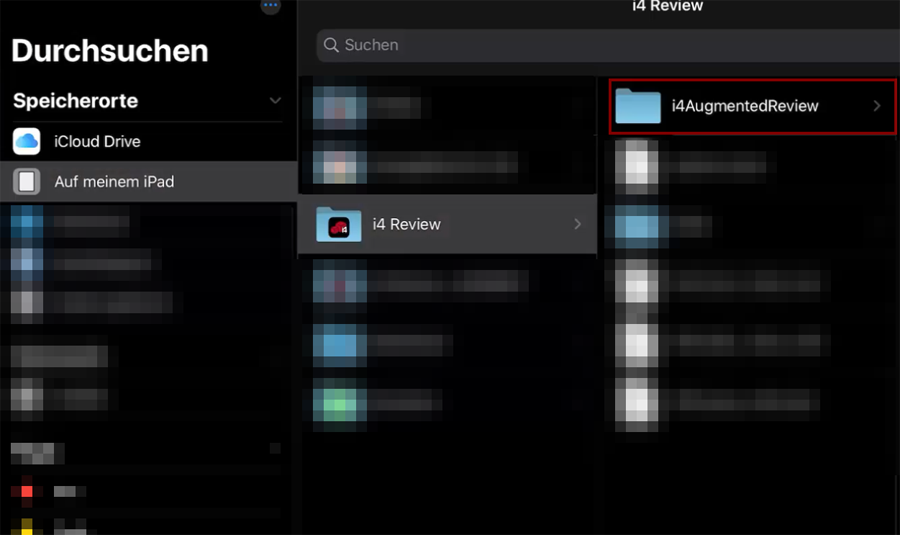
Place your FBX/OBJ files in the i4 Augmented Review directory.
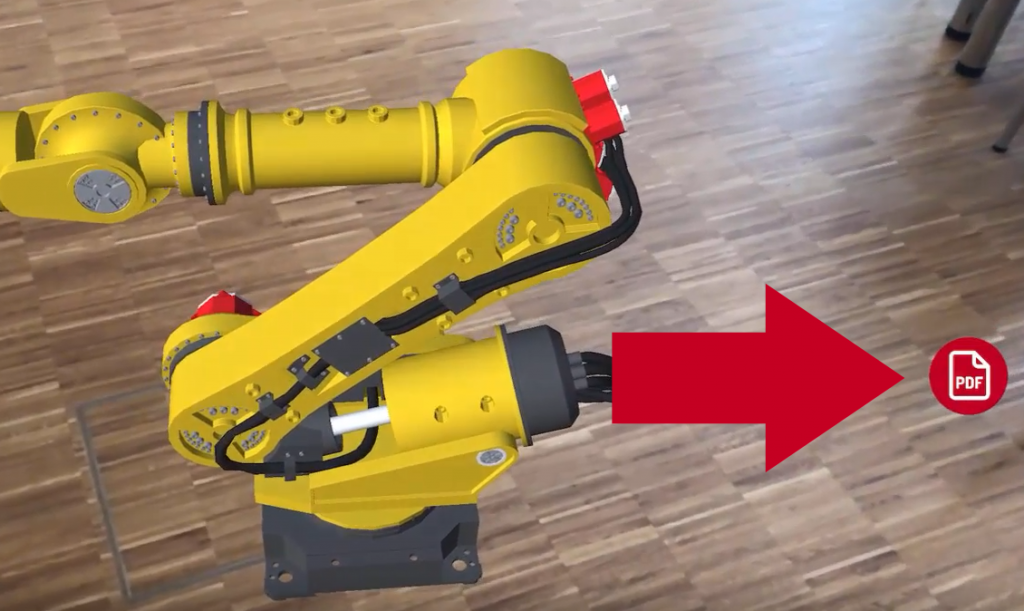
In addition, further information can be associated with each model, such as documents, images, web-links, audio and video.
Example for dat file structure:
data = machine.pdf
data = machine.txt
data = https://www.google.com/search?q=machine
data = machine.png
data = machine.mp3
data = machine.xlsx
| Type | Extension |
|---|---|
| Website | http:// https:// |
| Audio | .mp3 .wav |
| Image | .bmp .gif .png .jpg .jpeg .tif .tiff |
| Document | .txt .csv .rtf .doc .docx .xls .xlsx .ppt .pptx |
| Video | .avi .mpeg .mpg .mp4 |
| Info | other file extensions |