


Automatic Piping Isometrics for Fabrication and Installation
The information from this contact form is automatically forwarded to us via a secure connection and stored by us for further processing. By submitting the contact form, you agree to our data protection guidelines and thus to the storage of your personal data.
Use M4 ISO FX with your current 3D piping design system to generate piping isometrics from your PCF files.
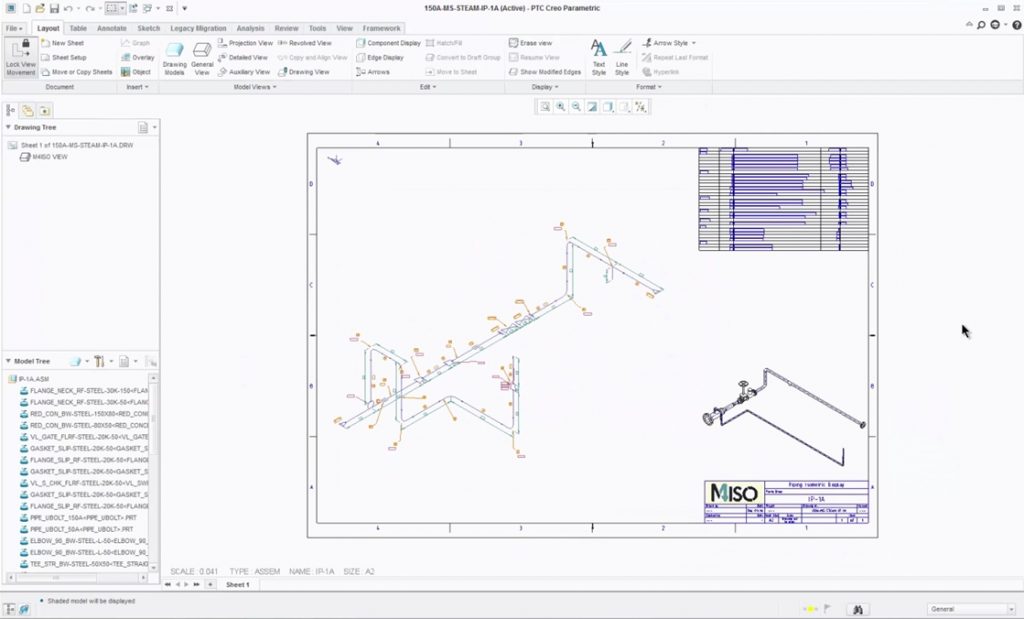
M4 ISO is available as an add-on module for Creo Piping and automatically generates piping isometrics from Creo piping models.
Piping Isometric Drawings from 3D Pipework Designs
M4 ISO FX is a complete solution for the generation and editing of piping isometrics. The standalone software offers the possibility to convert PCF files fully automatically into unscaled piping isometrics. In addition to the fully dimensioned and annotated piping isometrics, production-ready parts lists, pipe cut-length lists, weld and bend tables, are also generated at the same time.
Advantages for your company

M4 ISO works completely automatically enabling you to generate piping isometrics in a few seconds without manual effort.

All isometrics and parts lists are generated ready for production and styled to suit your processes. Bend data can also be output for NC pipe bending machines.

Support for Metric and Imperial units and all common dimensioning standards. Drawing styles and templates are also customisable.

Our team supports you as a partner and offers you a comprehensive service with a hotline for your daily questions.
M4 ISO Functionality
M4 ISO uses 3D pipework data to automatically create unscaled piping ISOs together with parts lists and other associated documents. The documents are produced in seconds, ready for production use, and styled to suit company drawing standards. The automated production of piping ISOs offers tremendous advantages over manually drawn 2D or isometric drawings, which in comparison are time-consuming to produce, highly prone to human error, and therefore inferior and much more expensive. With M4 ISO, project costs are always under control, even if the design undergoes numerous revisions before manufacture.
Unscaled
Dimensioning
Labelling
3D view
Bending tables
Breaks
Welding lists
Pipe Positions
Elevations and falls
Customisable symbols
Style templates
Parts Lists
More functions
- Automated piping isometrics
- Configurable detailed dimensions
- Unscaled & unambiguous
- Customisable templates & styles
- Detailed parts lists
- Parts lists as tables & files
- Bend tables and welding lists
- Extendable with design notes
Or contact our consultants:
+49 2841 9184-0

The fastest way to create piping isometrics
It is not without reason that piping isometrics (ISOs) are the most important design drawing used in pipework construction today. Piping ISOs are an integral part of the multi-stage design process. They accurately and clearly document the pipework design and contain all the information necessary for fabrication. Due to their unscaled nature, very long and complex pipe runs can be depicted using a single piping ISO drawing. They also permit an unobstructed view of all piping components and ensure that even the smallest components can be clearly seen, even on very long pipe runs. Individual piping components are represented by familiar, standardized isometric symbols. This ensures that piping ISOs are universally recognised and understood by pipework fabricators throughout industry, which in turn leads to higher quality and fewer manufacturing errors.
Pipework designs documented in line with production requirements
Through the use of industry-standard piping symbols and unscaled isometric representation, M4 ISO delivers production-ready piping ISOs at the push of a button. Piping ISOs are universally understood by pipework fabricators and clearly specify how individual pipe spools are to be manufactured and assembled. All piping components and pipes are automatically fully dimensioned and annotated. Detailed parts and cutting lists specify precisely the quantity and type of materials required. Machine-ready pipe bending tables also accelerate the fabrication process. Even welding lists are generated automatically to support downstream process at the construction site and beyond.
Get started with M4 ISO now
More security through comprehensive consulting and software testing
Apply for your trial license or contact our consultants. With our tutorials and online support you can easily try out the software. Our staff will advise and help you select the best package for your requirements.
Start quickly with on-site workshops and training courses
In addition to standard training courses, we also offer on-site workshops, which enable you to receive tailored training while working on your first project. This guarantees you the fastest possible start into the productive use of the software.
Continuously productive and always up-to-date
Our software maintenance includes extensive support including telephone support, all software updates and access to our customer portal. This enables us to effectively support you throughout your day.
Start your free trial now or contact us for advice
FAQ: Your frequently asked questions and our answers
Fill in the form on this page and we will then send you an email with all the information you need (download link, video tutorials and documentation). After the download, we will send you some more information, documents and links that will help you trial the software.
- PCF = Piping Component File.
- A PCF file is generated by piping design systems from 3D pipework models.
- The PCF file fully describes the 3D pipework and is a standard file format.
- M4 ISO generates a fully dimensioned piping isometric drawing from the PCF file, together with a parts list.
Simply contact our consultants. Use the contact form or simply call us: Simply contact our consultants. Use the contact form or simply call us: +49 2841 91840
Software maintenance includes technical support and software updates, including the latest versions. You also receive access to our online customer portal where you can request technical support and download the software and updates.